If your SOP does not match the job, your team will stop using it. The fix is simple: give each SOP an owner, review it on a set schedule, update it when work changes, track versions, and get field feedback fast.
Here’s the short version:
- You need one owner and one backup for each SOP.
- You should review SOPs by risk and how often the work changes.
- You should not wait for the calendar if there’s a software update, safety issue, pricing change, or crew workaround.
- You need a short update flow: check field input, edit the SOP, approve it, publish it, train the team.
- You should keep one live version, archive old ones, and log every change.
- You can use AI to draft edits, but people still need to check the steps and approve them.
A stale SOP can cost time, money, and trust. This article points to 82% higher productivity from structured onboarding with current SOPs. Want to improve new hire retention? Turns out having a structured onboarding helps!
If you want SOPs people will follow, you need a simple system to keep them current.
5 habits to keep SOPs updated...easily!
Assign Ownership and Set a Review Schedule
Every SOP needs a clear owner, a backup, and a set review rhythm. Start with ownership. Then decide how often the document should be checked.
Assign One Owner and One Backup to Each SOP
Each SOP should have one primary owner and one backup owner.
The primary owner is the person accountable for the process. They keep the document accurate, approve meaningful changes, and make sure the written steps still match what’s happening in the field. The backup owner fills in when the primary owner is out or moves into a different role.
For most small to mid-sized service teams, role-based ownership works best. The Operations Manager usually owns dispatch SOPs. The Service Manager owns field execution and safety procedures. The Office Lead handles administrative or financial processes.
Experienced technicians can also play a key part as technical reviewers. They check the steps, confirm decision rules, and point out drift when the written process no longer matches the job as it’s done day to day.
Set Review Dates Based on Risk and Rate of Change
Once ownership is set, review timing should follow two things: risk and how often the work changes.
Track SOPs in a simple spreadsheet with the owner, last review date, and next review date. If an SOP passes its review date, mark it as expired until someone reviews it.
Use Trigger-Based Reviews, Not Just Calendar Reviews
Calendar reviews help catch slow drift. Trigger-based reviews catch sudden changes.
Some events should force an SOP review right away, no matter where you are in the review cycle. That includes a safety near-miss, recurring customer complaints, a CRM rollout, a new service line, a pricing policy change, or a branch expansion. Say your dispatch software gets a new interface and your SOP points to a button that no longer exists. That document shouldn’t wait for the next scheduled review. It needs attention now.
When work changes, notify the SOP owner right away. A single Slack channel or shared inbox for SOP corrections keeps that process simple.
Follow a Simple SOP Update Workflow
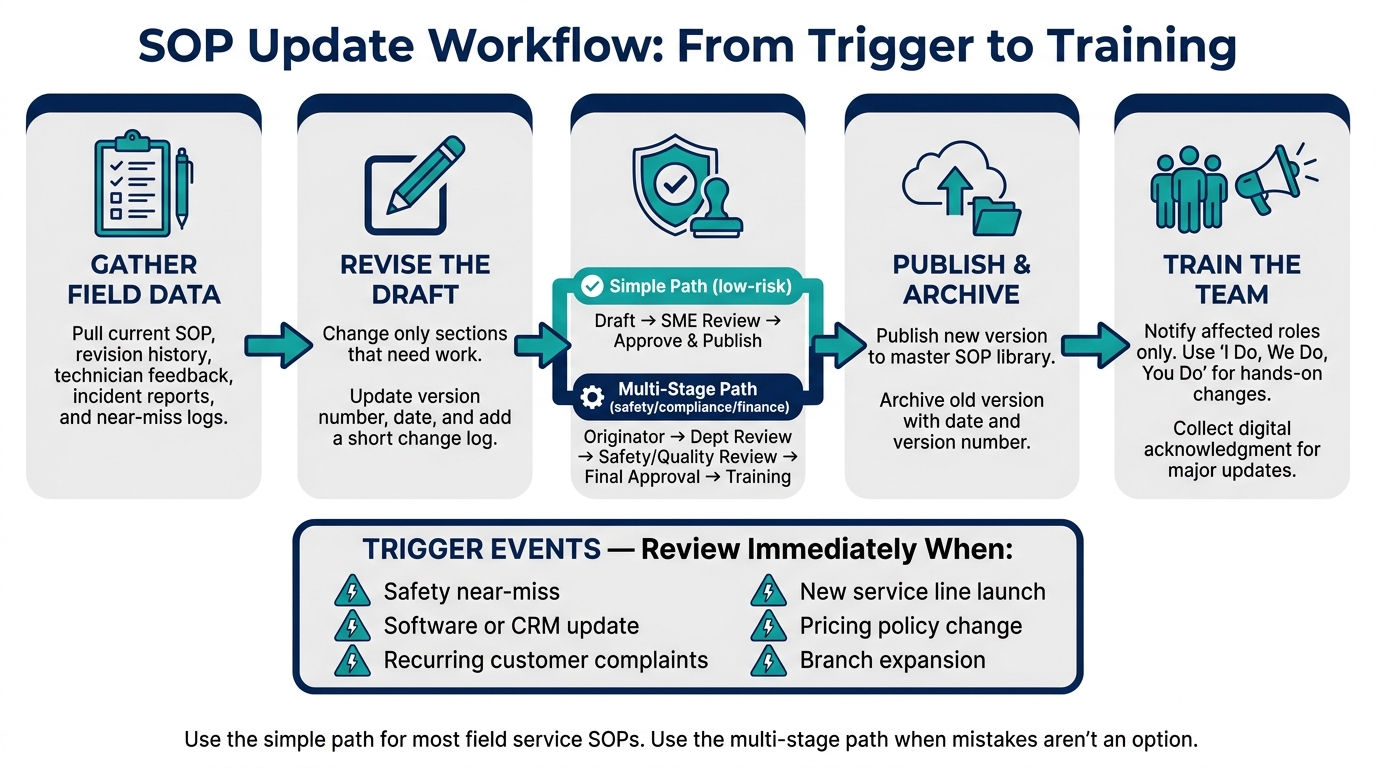
SOP Update Workflow: 5-Step Process for Keeping SOPs Current
Once ownership is set and a review trigger fires, move the SOP through a short, controlled update cycle. Think of each trigger as a drift check, not just a doc refresh. The goal is a focused edit cycle, not a full rewrite.
Gather Operating Data Before You Start Editing
Before you touch the draft, pull the current SOP, revision history, technician feedback, incident reports, and near-miss logs. If new hires keep getting stuck on the same step, or technicians keep pointing out the same exception, that’s your edit list. Let field reports lead the process, not gut feel.
Give a technician the current draft and ask:
- What’s missing?
- What’s wrong?
- What exceptions are now common?
Revise, Approve, and Publish the New Version
Change only the sections that need work. Then update the version number and last updated date at the top. Add a short change log that explains what changed and why.
Next, send the draft to the subject matter expert for confirmation, then to the process owner for sign-off.
Use the simple workflow for low-risk internal SOPs: Draft → Subject Matter Expert Review → Approve and Publish.
Use the multi-stage workflow for safety, compliance, or finance-heavy processes: Originator → Department Review → Safety/Quality Review → Final Approval → Training.
The simple path fits most field service operations. The multi-stage path is for processes where mistakes aren’t an option and each approval step needs a record of who approved what.
Once the draft is approved, publish the new version to the master SOP library and archive the old version in a dedicated folder for the audit trail.
As soon as the new version is live, move into version control and feedback tracking.
Train the Team on What Changed
Training technicians is what closes the gap between the written SOP and the way crews work in the field.
Notify only the roles affected by the change, explain it in plain English, and update any linked checklists or templates. For small updates, a team chat message with the link is enough. For larger updates, run a short walkthrough and collect digital acknowledgment before go-live.
For hands-on changes, use "I Do, We Do, You Do": demonstrate the step, practice it together, then have each person do it on their own.
After rollout, make the current version easy to find so crews follow the same process every time.
Control Versions and Build Feedback Into the Process
Once the SOP is published, lock that version, archive the old one, and set up a simple way for people in the field to send feedback fast.
Use Clear Names, Version Numbers, and Revision Logs
A clear file name cuts down on version mix-ups. You can use a format like SOP-Department-Process-v1.0 to make documents easy to search and spot at a glance. If your team works better with coded names, something like SOP-FS-DISPATCH-001 works too.
Not every change should be treated the same way. A small fix, like a corrected phone number or a formatting cleanup, should be logged but shouldn't change the version number. A moderate update, such as a revised step or a new screenshot, should move the minor version forward, like v1.1 → v1.2. If the process itself changes, move the major version, like v1.x → v2.0, and retrain the team.
Each SOP should also include a short revision log at the bottom with:
- Version number
- Date
- Who made the change
- A one-line note on what changed and why
That way, a technician coming back to the document can get the gist fast instead of rereading the whole thing.
For smaller teams, file naming may be enough. For growing teams or regulated teams, formal revision logs usually make more sense. Either way, the current version should be obvious before anything gets archived.
Archive Old Versions and Make the Current One Easy to Find
Old documentation isn't just unhelpful. It can cause mistakes.
Never delete older versions. Move them into a clearly labeled Archive or Retired SOPs folder with dates and version numbers attached. Then keep one live version in a central cloud drive or knowledge base. Links in your CRM, Slack, or project management tool should all point to that single source.
It also helps to group active SOPs by department, like HVAC, plumbing, electrical, and drain cleaning. When someone's in the field, often on a phone, they need to find the right doc without digging around.
Use simple status labels on each file:
- Active
- Draft
- Retired
That removes the guesswork.
Collect Feedback From Technicians and Office Staff on an Ongoing Basis
Version control falls apart if technicians and office staff don't have an easy way to flag issues. A dedicated feedback channel, whether that's a team chat channel, email inbox, or digital form, gives field staff a low-friction way to report when the written process no longer matches the job site. That's usually the first sign that the SOP needs another pass.
Different channels work better for different kinds of feedback:
The goal is simple: make feedback easy to send, easy to review, and easy to work back into the live SOP.
Use AI Tools to Keep SOPs Current and Easier to Maintain
Where AI Helps With SOP Updates
AI can speed up SOP revisions after field changes.
If a technician points out that a step no longer works as written, AI can turn a voice note or screen recording into a draft revision in seconds. That makes updates fast enough to keep up with what’s happening in the field.
It can also clean up formatting, add screenshots, and fix layout issues so the process owner can focus on accuracy. And if only one step changed, you only need to update that one step.
Use AI for the draft and the formatting. Use people to check the logic and approve the change.
How ServiceEmpire.AI Fits Into the SOP Lifecycle
For teams that want a faster starting point, AI can also create the first revision draft. Our tools here at ServiceEmpire.AI offer free, trade-specific SOP generators and other field-service tools that help teams draft updates faster.
Conclusion: Keep SOPs Current With Ownership, Cadence, and Field Feedback
Once the draft is approved, the last job is making the next update easy.
Keep the loop simple: update the SOP, publish the revision, and notify the team.
Start with one SOP that keeps tripping people up. Revise it with AI, approve it, publish the new version, and tell the crew what changed. Then run that same update loop on the next SOP.
FAQs
How do I know when an SOP is outdated?
An SOP is outdated when it no longer matches how work actually gets done.
That can happen when a process changes, a tool gets replaced, a role shifts, an approval step moves, or a policy or regulation is updated. Sometimes the warning signs show up in day-to-day work first: more rework, more escalations, the same exceptions popping up again and again, an audit finding a gap, or employees saying the steps are wrong.
It should also be treated as expired once the review date has passed.
To keep an SOP current, use:
- a clear owner
- a set review cadence
- trigger-based micro-reviews
- version control
Those four pieces help keep the document tied to reality instead of turning into cobwebs.
Who should approve SOP changes?
Each SOP should have one named owner. In most cases, that’s the person who runs the process or handles it day to day.
That owner is responsible for keeping the SOP accurate and serves as the main approver when changes come up.
Use a proportionate approach to approvals:
- Low-risk changes may need only the owner’s sign-off
- Medium-risk changes need the owner to approve the edits
- High-risk or compliance-heavy procedures may need approval from both the owner and a designated compliance reviewer
What should I do if my team ignores an SOP?
If your team ignores an SOP, start by assuming the SOP itself may be off. Look into it right away. In many cases, people skip a procedure because the steps no longer match how the work gets done. That makes it a process problem first, not just a people problem.
Set up a simple feedback channel so team members can flag errors or outdated instructions. That could be a form, a shared doc, or a team chat channel. The goal is to make reporting easy.
Then the process owner should review the feedback, confirm the right steps, update the SOP, and share any major changes through tracked retraining.